# \[Alire\] Which rp2040 runtime?
**URL:** https://forum.ada-lang.io/t/alire-which-rp2040-runtime/4051
**Category:** General
**Created:** [December 15, 2025, 3:19pm UTC](https://forum.ada-lang.io/t/alire-which-rp2040-runtime/4051 "2025-12-15T15:19:14Z")
**Posts on this page:** 15
**Page:** 1
### Author:  [@Lucretia](https://forum.ada-lang.io/u/Lucretia)
#### Post date: [December 15, 2025, 3:19pm UTC](https://forum.ada-lang.io/t/alire-which-rp2040-runtime/4051/1 "2025-12-15T15:19:14Z")
I bought an el cheapo rp2040 pico board (probably a clone) from [ali](https://www.aliexpress.com/item/1005009710618499.html) (16MB variant is probably overkill) because it was cheap.
I dug out the parts of a broken Kawai ES110 I bought to see if i could find out what’s wrong with it, but no luck so far, the plan was always to bolt on a Linux SBC and try to turn it into something useable as I can’t afford a replacement main board right now.
But I thought I’d start with this rp2040 as it’s here and useable. But what do I need from Alire?
The intention is to use the ES’ main panel (JST B13B-PH-K) the IO board for the MIDI out (only - via a JST B7B-PH-K pin) and the keybed for input (JST B15B-PASK-1). Need 28 pins at most.
And I’ve just realised they sent the wrong board, they sent me the [lite](https://www.aliexpress.com/item/1005009710618499.html?spm=a2g0o.order_list.order_list_main.4.79221802tJ4yMB) version and I cannot find a pin out for that bar what’s on the back, nor any docs about what a “lite” version is, yes a refund is happeningm, don’t know if I need to send this back and whether I can even use it now.
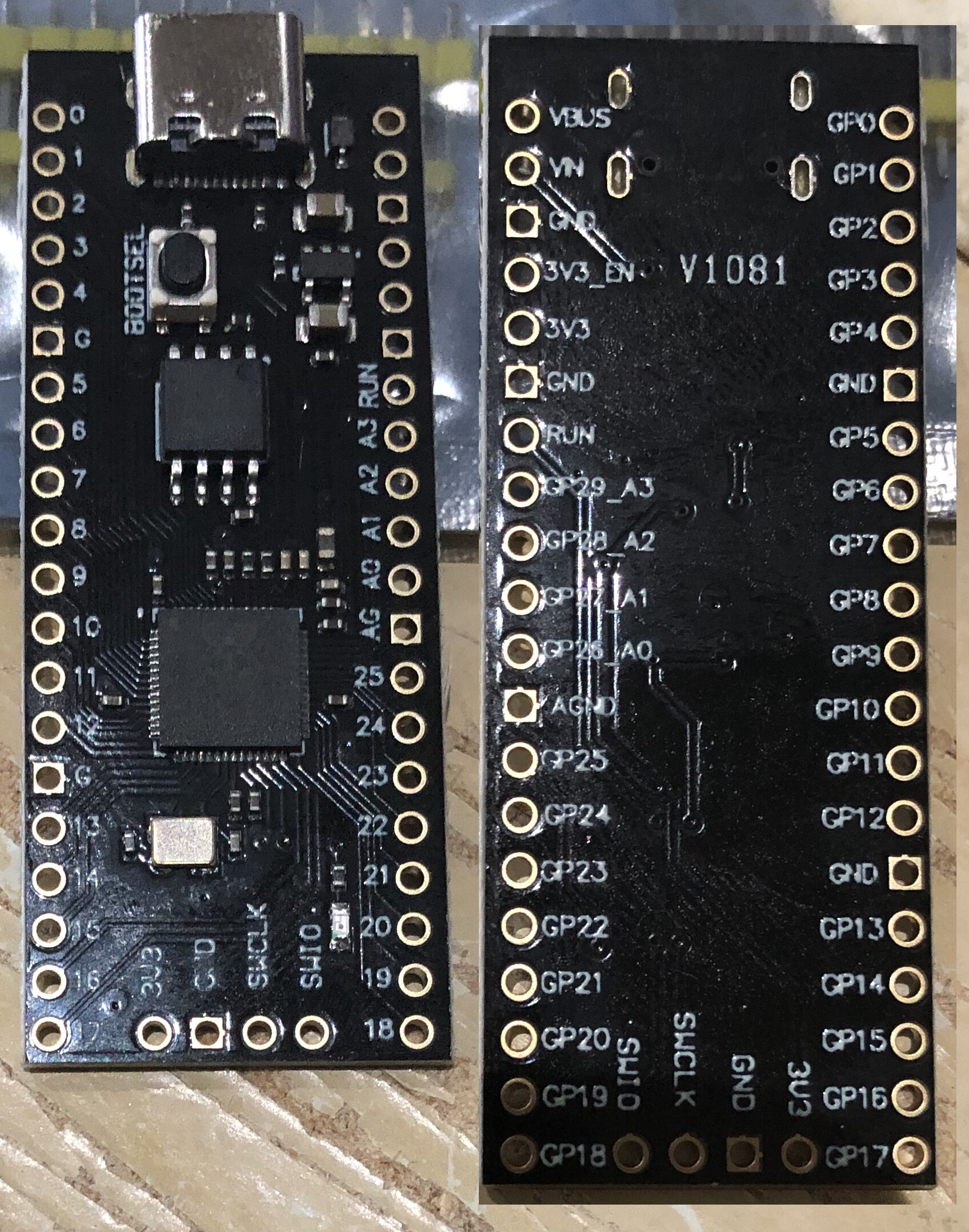
---
### Author:  [@RREE](https://forum.ada-lang.io/u/RREE)
#### Post date: [December 15, 2025, 3:55pm UTC](https://forum.ada-lang.io/t/alire-which-rp2040-runtime/4051/2 "2025-12-15T15:55:17Z")
You can get the official standard Pico board for 4€/$. It is not worth the trouble to order a cheap malfunctioning clone from China.
The reference for Ada on RP2040 is Jeremy’s page [Ada on the Raspberry Pi Pico](https://pico-doc.synack.me/).
You can already do quite a lot with the light runtime (ex-zero-footprint). I also had good results with the `light_tasking` runtime. See [GitHub - damaki/rp-runtimes: Ada/SPARK runtimes for the Raspberry Pi RP2040 and RP2350](https://github.com/damaki/rp-runtimes) and the discussions [here](https://forum.ada-lang.io/t/ann-configurable-bareboard-tasking-runtimes-for-rp2040/3888) and [here](https://forum.ada-lang.io/t/ann-bareboard-tasking-runtimes-for-the-rp2350-raspberry-pi-pico-2/3916)
---
### Author:  [@Lucretia](https://forum.ada-lang.io/u/Lucretia)
#### Post date: [December 15, 2025, 4:26pm UTC](https://forum.ada-lang.io/t/alire-which-rp2040-runtime/4051/3 "2025-12-15T16:26:23Z")
I bought it with free shipping and it was cheaper than ordering from here.
Yeah, I saw Jeremy’s page, what I wanted to know was which to use as there seems to be multiple different types.
---
### Author:  [@damaki](https://forum.ada-lang.io/u/damaki)
#### Post date: [December 15, 2025, 5:24pm UTC](https://forum.ada-lang.io/t/alire-which-rp2040-runtime/4051/4 "2025-12-15T17:24:12Z")
Regarding runtimes for the RP2040, the choice depends on how much language support you want. If you just want a “light” runtime (no tasking, minimal heap support, no exception propagation etc) then you can just use the `rp2040_hal` crate. You can check out Jeremy’s [blink](https://github.com/JeremyGrosser/pico_examples/tree/master/blink) example as an example app that uses a light runtime.
If you want more language support for things like Ada tasks (across both cores), protected objects, exception propagation, or a full heap allocator, then you can use either the [light\_tasking\_rp2040](https://alire.ada.dev/crates/light_tasking_rp2040) or [embedded\_rp2040](https://alire.ada.dev/crates/embedded_rp2040) crates. I have an example of using these runtimes to run tasks on both cores in my [pico\_smp\_demo](https://github.com/damaki/pico_smp_demo) repo.
I assume that this clone is meant to have the same flash chip as the genuine Pico (or at least one that is drop-in compatible with it) in which case you don’t need to worry about it. If the flash chip is not compatible, however, then you may need to tweak the crate configuration to make sure they use a compatible flash driver so that the QSPI is correctly configured.
---
### Author:  [@Lucretia](https://forum.ada-lang.io/u/Lucretia)
#### Post date: [December 15, 2025, 5:41pm UTC](https://forum.ada-lang.io/t/alire-which-rp2040-runtime/4051/5 "2025-12-15T17:41:15Z")
Ok, for ease probabbly go with embedded then.
As for the flash chip, it’s a boyamicro 25q128essig, no idea if that’s same or compatible.
---
### Author:  [@damaki](https://forum.ada-lang.io/u/damaki)
#### Post date: [December 15, 2025, 6:05pm UTC](https://forum.ada-lang.io/t/alire-which-rp2040-runtime/4051/6 "2025-12-15T18:05:47Z")
> [@Lucretia](#):
>
> As for the flash chip, it’s a boyamicro 25q128essig, no idea if that’s same or compatible.
From a quick look at the datasheet it appears compatible with the equivalent Winbond part, so you shouldn’t need to change anything. You should be able to build the pico\_smp\_demo project I linked above and it should run and blink the LED on the board (assuming the LED is on the same GPIO as the Pico, which it probably is).
---
### Author:  [@Lucretia](https://forum.ada-lang.io/u/Lucretia)
#### Post date: [December 15, 2025, 6:44pm UTC](https://forum.ada-lang.io/t/alire-which-rp2040-runtime/4051/7 "2025-12-15T18:44:05Z")
I get continuity with the tiny resistor I need a billion times magnification on to see and pin labeled “25” and the moving the probe up one to “AG” lights up the LED.
---
### Author:  [@damaki](https://forum.ada-lang.io/u/damaki)
#### Post date: [December 15, 2025, 7:08pm UTC](https://forum.ada-lang.io/t/alire-which-rp2040-runtime/4051/8 "2025-12-15T19:08:05Z")
That’s the same pin as the Pico, so blinky demos for the Pico should also work on your clone.
---
### Author:  [@Lucretia](https://forum.ada-lang.io/u/Lucretia)
#### Post date: [December 16, 2025, 10:50am UTC](https://forum.ada-lang.io/t/alire-which-rp2040-runtime/4051/9 "2025-12-16T10:50:59Z")
Yup, the blink demo works, had to install elf2uf2-rs to get it converted with cargo, both uf2-util and pico-uf2 didn’t work for me because I didn’t know what to do with them.
---
### Author:  [@damaki](https://forum.ada-lang.io/u/damaki)
#### Post date: [December 16, 2025, 11:05am UTC](https://forum.ada-lang.io/t/alire-which-rp2040-runtime/4051/10 "2025-12-16T11:05:12Z")
Glad you got it working!
---
### Author:  [@Lucretia](https://forum.ada-lang.io/u/Lucretia)
#### Post date: [January 20, 2026, 9:58pm UTC](https://forum.ada-lang.io/t/alire-which-rp2040-runtime/4051/12 "2026-01-20T21:58:10Z")
With the light\_Tasking and embedded runtimes, can you have multiple tasks running on both cores or just one task per core?
---
### Author:  [@damaki](https://forum.ada-lang.io/u/damaki)
#### Post date: [January 20, 2026, 10:13pm UTC](https://forum.ada-lang.io/t/alire-which-rp2040-runtime/4051/13 "2026-01-20T22:13:17Z")
You can have multiple tasks on both cores. The runtime will take care of context switching between them on each core based on their priority in the usual manner.
---
### Author:  [@Lucretia](https://forum.ada-lang.io/u/Lucretia)
#### Post date: [February 14, 2026, 8:38pm UTC](https://forum.ada-lang.io/t/alire-which-rp2040-runtime/4051/14 "2026-02-14T20:38:01Z")
Ok, created my own BSP which is basically a set of renamings for the GP? pins and adding GP29. I’ve created a blink demo which used GP0 and GP29 and both work.
---
### Author:  [@Lucretia](https://forum.ada-lang.io/u/Lucretia)
#### Post date: [February 14, 2026, 8:47pm UTC](https://forum.ada-lang.io/t/alire-which-rp2040-runtime/4051/15 "2026-02-14T20:47:39Z")
Here’s the [repo](https://github.com/Lucretia/pico_lite_bsp).
---
### Author:  [@krischik](https://forum.ada-lang.io/u/krischik)
#### Post date: [June 30, 2026, 11:05am UTC](https://forum.ada-lang.io/t/alire-which-rp2040-runtime/4051/16 "2026-06-30T11:05:47Z")
> [@Lucretia](#):
>
> But what do I need from Alire?
You could check my tutorial. Which runtime you need depends on what you want to do.
> **[PI Ada Tutorial](https://pi-ada-tutorial.sourceforge.io/)**
>
> Raspberry Pi Pico