# How to delete a file from a GitHub branch
**URL:** https://forum.ada-lang.io/t/how-to-delete-a-file-from-a-github-branch/3800
**Category:** General
**Created:** [September 5, 2025, 3:31pm UTC](https://forum.ada-lang.io/t/how-to-delete-a-file-from-a-github-branch/3800 "2025-09-05T15:31:16Z")
**Posts on this page:** 8
**Page:** 1
### Author:  [@Nordic\_Dogsledding](https://forum.ada-lang.io/u/Nordic_Dogsledding)
#### Post date: [September 5, 2025, 3:31pm UTC](https://forum.ada-lang.io/t/how-to-delete-a-file-from-a-github-branch/3800/1 "2025-09-05T15:31:16Z")
Docs say:
- Navigate to the repository and locate the file you want to delete.
- Click on the file to open it.
- Click the trash can icon (🗑) labeled “Delete this file” at the top right.
There is no trash icon. It’s my repository, I have write access, can edit files and upload - but not delete!
What the hell.
---
### Author:  [@RREE](https://forum.ada-lang.io/u/RREE)
#### Post date: [September 5, 2025, 6:16pm UTC](https://forum.ada-lang.io/t/how-to-delete-a-file-from-a-github-branch/3800/2 "2025-09-05T18:16:11Z")
```ada
git switch my_branch
git rm file
```
---
### Author:  [@fatso83](https://forum.ada-lang.io/u/fatso83)
#### Post date: [September 5, 2025, 6:21pm UTC](https://forum.ada-lang.io/t/how-to-delete-a-file-from-a-github-branch/3800/3 "2025-09-05T18:21:41Z")
There is much to say here, but
1. Which docs are you talking about?
2. There is no trash can icon in the Github UI that I can remember of recent years
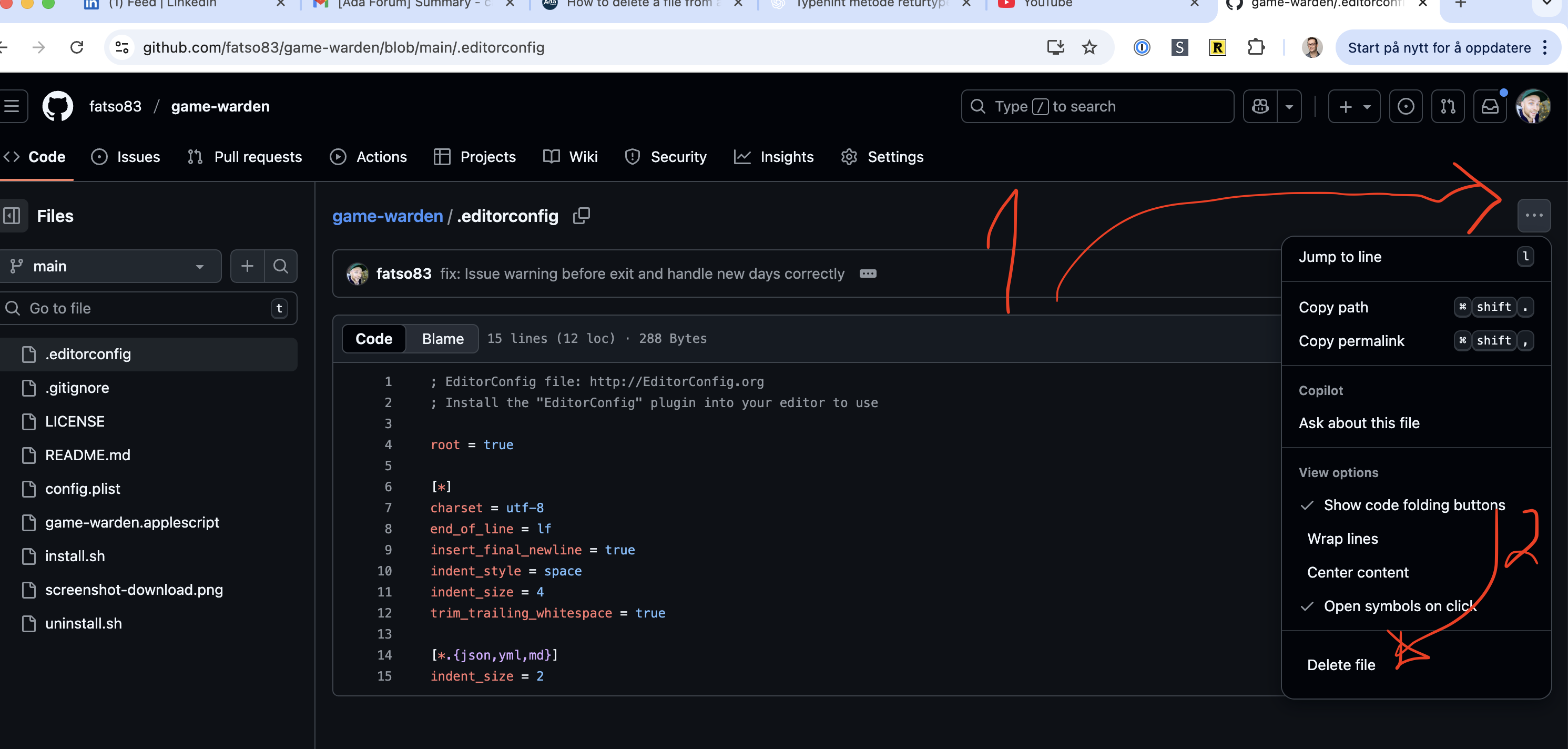
3. This is how you do it if doing it graphically (just a random repo of mine):
---
### Author:  [@fatso83](https://forum.ada-lang.io/u/fatso83)
#### Post date: [September 5, 2025, 6:23pm UTC](https://forum.ada-lang.io/t/how-to-delete-a-file-from-a-github-branch/3800/4 "2025-09-05T18:23:06Z")
The real answer is of course to spend 1 hour reading Chapter 1 through 3 of the free Pro Git book. Best spent hour of my professional career. [Pro Git by Scott Chacon](https://git-scm.com/book/en/v2)
---
### Author:  [@mgrojo](https://forum.ada-lang.io/u/mgrojo)
#### Post date: [September 5, 2025, 7:50pm UTC](https://forum.ada-lang.io/t/how-to-delete-a-file-from-a-github-branch/3800/5 "2025-09-05T19:50:58Z")
> [@fatso83](#):
>
> There is no trash can icon in the Github UI that I can remember of recent years
There was one.
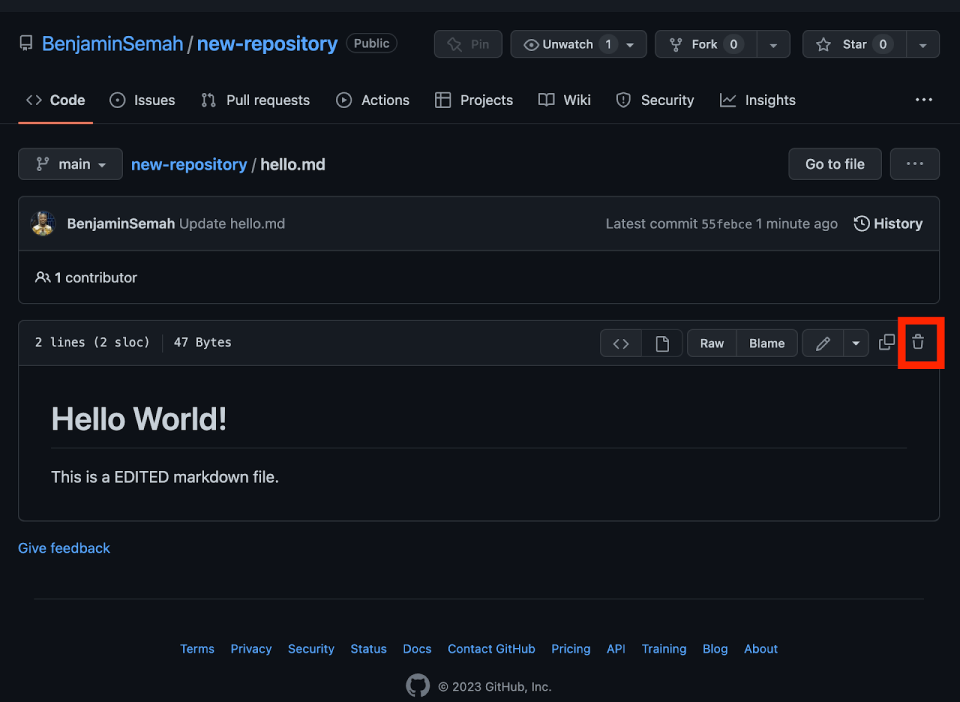
The funny thing is that duckduckgo found that image on an article titled “How to Use GitHub in 2025”.
> **[What Is GitHub? Ultimate Guide on How to Use GitHub in 2025](https://hackr.io/blog/how-to-use-github)**
>
> Whether a coding newb or a seasoned pro, you need to know how to use GitHub. Check out our ultimate guide on how to use GitHub in 2025, including creating repos, pull requests, and more.
---
### Author:  [@Nordic\_Dogsledding](https://forum.ada-lang.io/u/Nordic_Dogsledding)
#### Post date: [September 6, 2025, 6:15pm UTC](https://forum.ada-lang.io/t/how-to-delete-a-file-from-a-github-branch/3800/6 "2025-09-06T18:15:53Z")
> [@fatso83](#):
>
> Which docs are you talking about?
I asked the copilot and got irritating answers.
Thanks to you all for the links. Today I found the delete command - I would bet that it was not there the last time - mebby I’m blind…
---
### Author:  [@krischik](https://forum.ada-lang.io/u/krischik)
#### Post date: [September 7, 2025, 7:53am UTC](https://forum.ada-lang.io/t/how-to-delete-a-file-from-a-github-branch/3800/7 "2025-09-07T07:53:49Z")
> [@Nordic\_Dogsledding](#):
>
> I asked the copilot and got irritating answers.
Just for the fun of it I asked Grok:
* * *
I can definitely help with clear steps on how to delete a file from a GitHub branch! Here’s a straightforward guide:
### Steps to Delete a File from a GitHub Branch
#### Option 1: Using the GitHub Web Interface
1. **Navigate to the Repository** : Go to the GitHub repository in your browser.
2. **Switch to the Branch** : Use the branch dropdown menu to select the branch containing the file you want to delete.
3. **Locate the File** : Browse to the file you want to delete.
4. **Delete the File** :
- Click on the file to open it.
- Click the trash can icon (or “Delete this file”) at the top-right of the file view.
5. **Commit the Change** :
- Enter a commit message describing the deletion (e.g., “Removed outdated file”).
- Choose whether to commit directly to the branch or create a pull request.
- Click “Commit changes” or “Propose file change” if creating a pull request.
6. **Verify Deletion** : Ensure the file is removed from the branch by checking the file list or pull request.
#### Option 2: Using Git Command Line
1. **Clone the Repository** (if not already cloned):
```bash
git clone
cd
```
2. **Switch to the Branch** :
```bash
git checkout
```
3. **Delete the File** :
```bash
git rm
```
Example: `git rm docs/oldfile.txt`
4. **Commit the Change** :
```bash
git commit -m "Deleted "
```
5. **Push to GitHub** :
```bash
git push origin
```
6. **Verify Deletion** : Check the branch on GitHub to confirm the file is gone.
#### Notes:
- If the file is in a pull request, deleting it via the web interface or CLI will update the pull request automatically.
- Ensure you have the necessary permissions to modify the branch.
- If the branch is protected, you may need to create a pull request and get approval to merge the deletion.
* * *
---
### Author:  [@RBSF](https://forum.ada-lang.io/u/RBSF)
#### Post date: [August 13, 2026, 1:55pm UTC](https://forum.ada-lang.io/t/how-to-delete-a-file-from-a-github-branch/3800/8 "2026-08-13T13:55:04Z")
Looks interesting, will have a look. Thanks