Ok, deleted it and re-with’d it, it built.
I’ve found that GNATdoc 26 is now available in Alire, and try with it:
package P is

   procedure My;
   --  Here is something:
   --
   --     Z85_Alphabet : constant BToA.Alphabet_85 :=
   --       "0123456789" &
   --       "abcdefghij" &
   --       "klmnopqrst" &
   --       "uvwxyzABCD" &
   --       "EFGHIJKLMN" &
   --       "OPQRSTUVWX" &
   --       "YZ.-:+=^!/" &
   --       "*?&<>()[]{" &
   --       "}@%$#";

end P;
GNATdoc produce
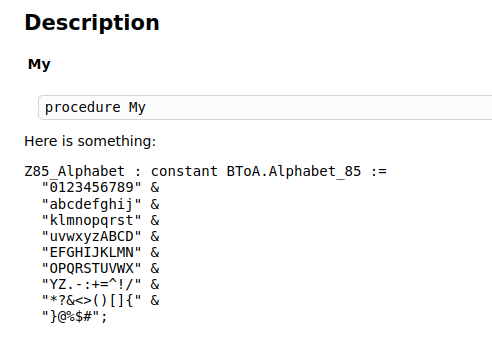
Backticks generates probably incorrect HTML, can you please open an issue on GH?
That works, thank you. I’m not a fan of markdown. I read the spec as 4 leading spaces should work but I guess it needs a leading section with 2 and then 6. I might well be missing a lot of details but why not just copy the comment in WYSIWYG as it seems to me Ada comments can be formatted using 2 for wrapped by ALS (format file) or 3 leading spaces to not wrap the current comment line?
EDIT: I’ll open a separate issue on this and perhaps it will be closed very quickly.
Markdown uses at least 4 spaces. For GNATdoc it is changed to at least three spaces, because it is usual indentation level for Ada.
Also, spaces are counted not after -- but after remove of “shared margin” in the comments block. It relax requiremets to number of spaces after --: one, two, three, or no spaces at all.
Seems that this no longer works with the new Gnat Studio and I have to wrap comments manually now 
Okay. I always thought Ada indentation was three spaces after – but you’re saying after “shared margin”
How do you run gnatdoc with alire after you have it installed?
with Alire?
I just pass it the .gpr project file on the command line
It gets installed to ~/.local/share/alire/builds/gnatdoc_26.0.0_a6f3f96c/0569d0ab72b352406898836efff9932c12f173dd4750ba83c78ee7e8e10b41d6/bin//gnatdoc so I executed it with alr exec -- ~/local/share/alire/builds/gnatdoc_26.0.0_a6f 3f96c/0569d0ab72b352406898836efff9932c12f173dd4750ba83c78ee7e8e10b41d6/bin//gnatdoc sdl3ada.gpr -O docs/gnatdoc
It’s not in the PATH.
Req: A standard template that gnatdoc uses that works either light/dark or doesn’t break with browser extensions like dark reader, currently it produces something impossible to read.
It comes with Gnat Studios bin directory that is likely added to your path.
As it’s a standalone tool you can also do alr get gnatdoc in your project root instead of withing it and then there will be a bin directory after cding in and building that you can copy to anywhere that’s in your PATH or run from it’s built location with a full path.
$ alr get -b  gnatdoc
error: Cannot get a release inside another alr release, stopping.
There’s no alire.toml files there.
Works for me on Linux in an empty folder 
Use `alr install gnatdoc` and ensure that `$HOME/.alire/bin` is in your PATH.
Get the same response without the --force.
$ alr --force install  gnatdoc=26.0.0
ⓘ Computing solutions...
error: Could not find a complete solution for gnatdoc=26.0.0
error: Best incomplete solution is:
error: Dependencies (solution):
error:    adasat=26.0.0
error:    gnat=16.0.0 (gnat_external)
error:    gnatcoll=26.0.0
error:    gnatcoll_gmp=26.0.0
error:    gnatcoll_iconv=26.0.0
error:    gnatcoll_minimal=26.0.0
error:    gnatcoll_projects=26.0.0
error:    gnatdoc=26.0.0
error:    gprconfig_kb=26.0.0
error:    langkit_support=26.0.0
error:    libadalang=26.0.0
error:    libgpr=26.0.0
error:    libgpr2=26.0.0
error:    make=4.4.1
error:    markdown=26.0.0
error:    prettier_ada=26.0.0
error:    vss_extra=26.0.0
error:    vss_text=26.0.0
error:    xmlada=26.0.0
error: Dependencies (missing):
error:    libgmp* (indirect,hinted)
error: Dependencies (forbidden):
error:    libgnatdoc*
error: Dependencies (graph):
   gnatcoll=26.0.0          --> gnat=16.0.0 (gnat_external) (>=14)
   gnatcoll=26.0.0          --> gnatcoll_minimal=26.0.0 (~26.0.0)
   gnatcoll_gmp=26.0.0      --> gnatcoll_minimal=26.0.0 (~26.0.0)
   gnatcoll_gmp=26.0.0      --> libgmp*
   gnatcoll_iconv=26.0.0    --> gnatcoll=26.0.0 (~26.0.0)
   gnatcoll_minimal=26.0.0  --> gnat=16.0.0 (gnat_external) (>=14)
   gnatcoll_projects=26.0.0 --> gnat=16.0.0 (gnat_external) (>=14)
   gnatcoll_projects=26.0.0 --> gnatcoll=26.0.0 (~26.0.0)
   gnatcoll_projects=26.0.0 --> libgpr=26.0.0 (>=25.0.0)
   gnatdoc=26.0.0           --> libadalang=26.0.0 (^26)
   gnatdoc=26.0.0           --> libgpr2=26.0.0 (^26)
   gnatdoc=26.0.0           --> markdown=26.0.0 (^26)
   gnatdoc=26.0.0           --> vss_extra=26.0.0 (^26)
   gnatdoc=26.0.0           --> vss_text=26.0.0 (^26)
   langkit_support=26.0.0   --> adasat=26.0.0 (^26)
   langkit_support=26.0.0   --> gnatcoll=26.0.0 (^26)
   langkit_support=26.0.0   --> gnatcoll_gmp=26.0.0 (^26)
   langkit_support=26.0.0   --> gnatcoll_iconv=26.0.0 (^26)
   langkit_support=26.0.0   --> prettier_ada=26.0.0 (^26)
   libadalang=26.0.0        --> gnatcoll=26.0.0 (^26)
   libadalang=26.0.0        --> gnatcoll_gmp=26.0.0 (^26)
   libadalang=26.0.0        --> gnatcoll_iconv=26.0.0 (^26)
   libadalang=26.0.0        --> gnatcoll_projects=26.0.0 (^26)
   libadalang=26.0.0        --> langkit_support=26.0.0 (^26)
   libadalang=26.0.0        --> libgpr2=26.0.0 (^26)
   libgpr=26.0.0            --> gnat=16.0.0 (gnat_external) (>=15)
   libgpr=26.0.0            --> xmlada=26.0.0 (~26.0.0)
   libgpr2=26.0.0           --> gnatcoll=26.0.0 (^26.0.0)
   libgpr2=26.0.0           --> gnatcoll_gmp=26.0.0 (^26.0.0)
   libgpr2=26.0.0           --> gnatcoll_iconv=26.0.0 (^26.0.0)
   libgpr2=26.0.0           --> gprconfig_kb=26.0.0 (^26.0.0)
   libgpr2=26.0.0           --> make=4.4.1 (*)
   libgpr2=26.0.0           --> xmlada=26.0.0 (^26.0.0)
   markdown=26.0.0          --> vss_extra=26.0.0 (~26.0.0)
   markdown=26.0.0          --> vss_text=26.0.0 (~26.0.0)
   prettier_ada=26.0.0      --> gnatcoll=26.0.0 (^26)
   prettier_ada=26.0.0      --> vss_text=26.0.0 (^26)
   vss_extra=26.0.0         --> vss_text=26.0.0 (^26.0.0)
   xmlada=26.0.0            --> gnat=16.0.0 (gnat_external) (>=11)
error: Installation cannot continue.
For some reason it’s not finding dev-libs/gmp for libgmp.
Which Linux do you use? May be you need to install libgmp-dev package?
On my Ubuntu 22 it just works.
Gentoo, there is only the package I mentioned. I added gentoo to alire along with the gentoo section in libgmp.