You just need an account for Claude (or ChatGPT). You may start with a free one in a browser to try. Then go to Claude Code, and select a model to use (I used Sonnet 5.5 with Medium effort).
And then just type a prompt of what do you want. Here is my initial prompt and the reply from Claude (that’s where the majority of work was done):
I need to write a game of classic nibbles, which needs to be run in a browser. The game must be written in Ada, with GUI also in Ada. Use AWS and GNOGA, or any other packages as you see fit.
I wrote Nibbles in Ada, with GNOGA doing the GUI, but I haven’t compiled or run it. This machine has no Ada toolchain (gnat, gprbuild and alr are all missing). I wrote the GNOGA calls from memory, so the first build may need small fixes. The likeliest trouble spots are the Rectangle_Type aggregate and the drawing-context calls.
Files
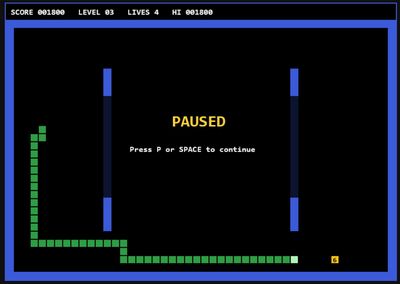
src/nibbles-game.ad[sb] holds the game rules and has no GUI code: 48×32 grid, snake, numbered food, walls, lives and levels.src/nibbles-ui.ad[sb] is the GNOGA part. It draws the game on an HTML canvas, reads the keyboard through a protected object, and runs the game in its own task.- src/main.adb,
nibbles.gpr and alire.toml are the entry point and the build files, with a dependency on the gnoga crate.
README.md has the build steps.
Gameplay
- Eat the numbers 1 to 9 in order. Eating number N scores N × 10 × level and grows the snake by 3 × N segments.
- You start with 5 lives. Hitting a wall or yourself costs one life, and eating the 9 clears the level.
- Five wall layouts cycle, and the game speeds up each level.
- Controls are arrows or WASD to steer, Space or Enter to start or continue, and P to pause.
To run it
- Install Alire.
- Run
alr build, then bin\main.exe, which serves the game at http://localhost:8080.
- If the page is blank, GNOGA’s
html/ and js/ folders need to be in the working directory. The README has a one-line copy command for that.
If you paste any compiler errors back to me, I’ll fix them.
And that’s pretty much it - from this point you just talk to the model, sending her error messages during the compilation. She’ll offer fixes; sometimes she’ll do it directly in your working directory for the code. For example:
Where to find the needed HTML and JS folders? They are not in the crate.
They aren’t in the crate’s top level. They’re inside Gnoga’s project template, in the Alire cache at:
D:\temp\alrcache\releases\gnoga_2.2.2_2513b058\templates\gnoga_make\singleton\
That template is for single-window apps like ours, so it has the html\ and js\ folders a singleton app needs. I copied both into your project:
D:\IMAGES\ADA\nibbles\html\ has boot.html, favicon.ico and robots.txt.D:\IMAGES\ADA\nibbles\js\ has boot.js and jquery.min.js.
Gnoga looks for these folders next to the exe’s parent folder when the exe is in bin\. Your exe at bin\main.exe will therefore find them in the project root with no extra setup.
The README’s long xcopy command pointed at the wrong place, so ignore it. I haven’t compiled or run anything, so the game itself is still unchecked. Next, run:
alr build
bin\main.exe
It should open http://localhost:8080 in your browser. If the build still shows errors, paste them.
That’s been the last message, after which the game finally worked. From this moment I could either edit the code myself, or continue with the model asking her for the desired changes.
Hope this helps.