LEA is a Lightweight Editor for Ada
Alire crate: here
Source repository #1: here
Source repository #2: here
Web site: here
 Changes since last announcement here:
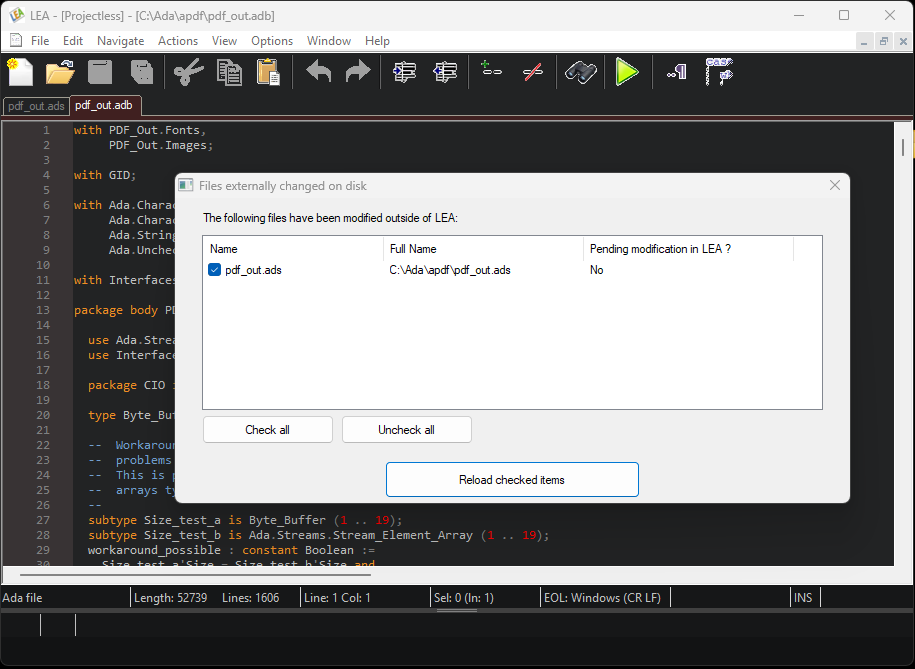
- LEA now checks externally changed files, à la GNAT Studio, and offers to reload the contents into the respective editor windows - see screenshot below. For instance if you use LEA as the external editor for GNAT Studio and have the same Ada source open in both, you don’t risk having the following situation: modifying something in the GNAT Studio editor window, saving and closing that editor window, then modifying something else in the LEA editor window, saving and then losing the changes made in GNAT Studio.
The LEA executable is standalone, holds in 4 MB and doesn’t require an installation procedure.
Features:
- Multi-document
- Multiple undo’s & redo’s
- Multi-line (vertical) & multi-point edit, rectangular selections
- Color themes, easy to switch
- Duplication of lines and selections
- Syntax highlighting
- Parenthesis matching
- Bookmarks
- Includes HAC, the HAC Ada Compiler
- Smart editor features (auto-completion, navigation, mouse-hover infos)
- Includes numerous examples of Ada programs, ready to be run
- Single executable, runs without installation
- Free, Open-Source
LEA is programmed in Ada, as well as HAC.
Enjoy!