Is it to set the character type to create characters (on screen) of equal size to create neat tables
Set a monospaced font on the console.
Text_IO does not define the width of displayed characters. There is only the Col function counting the position in the line.
When Get is called with Width>0, exactly so many characters are read starting from the current Col or as many as there are before the line end, whichever comes first.
It is not easy even with monospaced fonts. First, characters is wrong term. Terminal has lines of display cells. Unicode grapheme clusters can occupy one or two display cells.
You can use vss-text to count necessary amount of display cells for given string, and Text_IO to push information into terminal.
The problem I have is I need to set a closed rectangle around a peace of text I that has various length and height of lines. I can do that using -,_, |.
I will be able to do so if I do have fonts like Courier, where all supported characters have the same outside dimensions. How can I make use of such monospace fonts. Till now I have not found a package in ADA that can do set another font to use in only one program as is possible in Gtk
with Ada.Text_IO;        use Ada.Text_IO;
with Ada.Strings.Fixed;  use Ada.Strings.Fixed;
with Strings_Edit.UTF8;  use Strings_Edit.UTF8;

procedure Test is
   HL : constant String := Image (16#2015#);
   VL : constant String := Image (16#2502#);
   TL : constant String := Image (16#250c#);
   TR : constant String := Image (16#2510#);
   BL : constant String := Image (16#2514#);
   BR : constant String := Image (16#2518#);

begin
   Put_Line (TL & 19 * HL  & TR);
   Put_Line (VL & "    Hello World!   " & VL);
   Put_Line (BL & 19 * HL  & BR);
end Test;
Produces this:
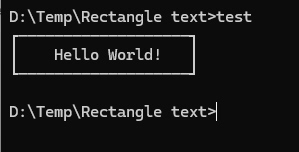
Console font is monospace by default.
You can change the console font using the means provided by the console application and the operating system at hand. There are a few thousand different consoles, nothing impossible… 
Ok, so this is only going to work nicely on a monospaced font. (Luckily console-text is monospace by default; it can be changed though.) There are line-drawing glyphs on some systems, though not all. (TL;DR: There may be factors to consider in your system.)
On this note, a side-tangent: there was a library from Borland in the DOS days called “TurboVision” —there are Pascal and C forms of it— and in this library they had exactly this sort of stuff: windows, menus, dialogs, etc, all text-mode. (The DOS Turbo Pascal IDE was written in this.)
Consider carefully if this is where you want to pour your effort.
DOS libraries used non-Unicode code pages. They will not work if the console is UTF-8. To convert the output from a legacy encoding to UTF-8 see
It looks from rhe example with the examole starts with:
may be the solution of my problem but trying it I get the error message:
file Ada.Strings_Edit.UTF8 not found, where can I find it?
It is a part of the Strings_Edit library. As it was already said you need to be careful with Unicode encoding. Visual character width /= number of UTF-8 octets /= number of code points. You can calculate all of these using the the library and then correct the output field width (=number of octets) to correspond the visual width.
Yeah, but if we wanted to do it, we should do it right: basically copy the design of Delphi’s VCL (Visual Component Library), add in the lessons-learned from TurboVision, and we could have a generally usable system that renders in text-mode. (With a little care, we could even make the base components dual-rendering, usable in both text-mode and graphics-mode; this would be very useful for utilities, particularly of the low level variety)
I think I’d have fun with that! TurboVision taught me OOP.